


For creative professionals and dedicated macOS users, the Apple Studio Display (ASD) has reigned supreme as the gold-standard benchmark. With its perfect 27" size and 218 ppi pixel density, flawless macOS integration, as well as premium aluminium enclosure, it delivers an unparalleled out-of-the-box desktop experience. Yet, at a starting price of $2,599, it demands a steep premium that leaves a massive vacuum for the mid-market.
Alternatives have emerged over time, but each brought specific caveats. Now – BenQ has recently released the Mac friendly MA270S and it offers a compelling competitor at a perfectly reasonable $1,499 price. So how does it stack up against the Apple Studio Display and other brands trying to claim the mid-tier market?
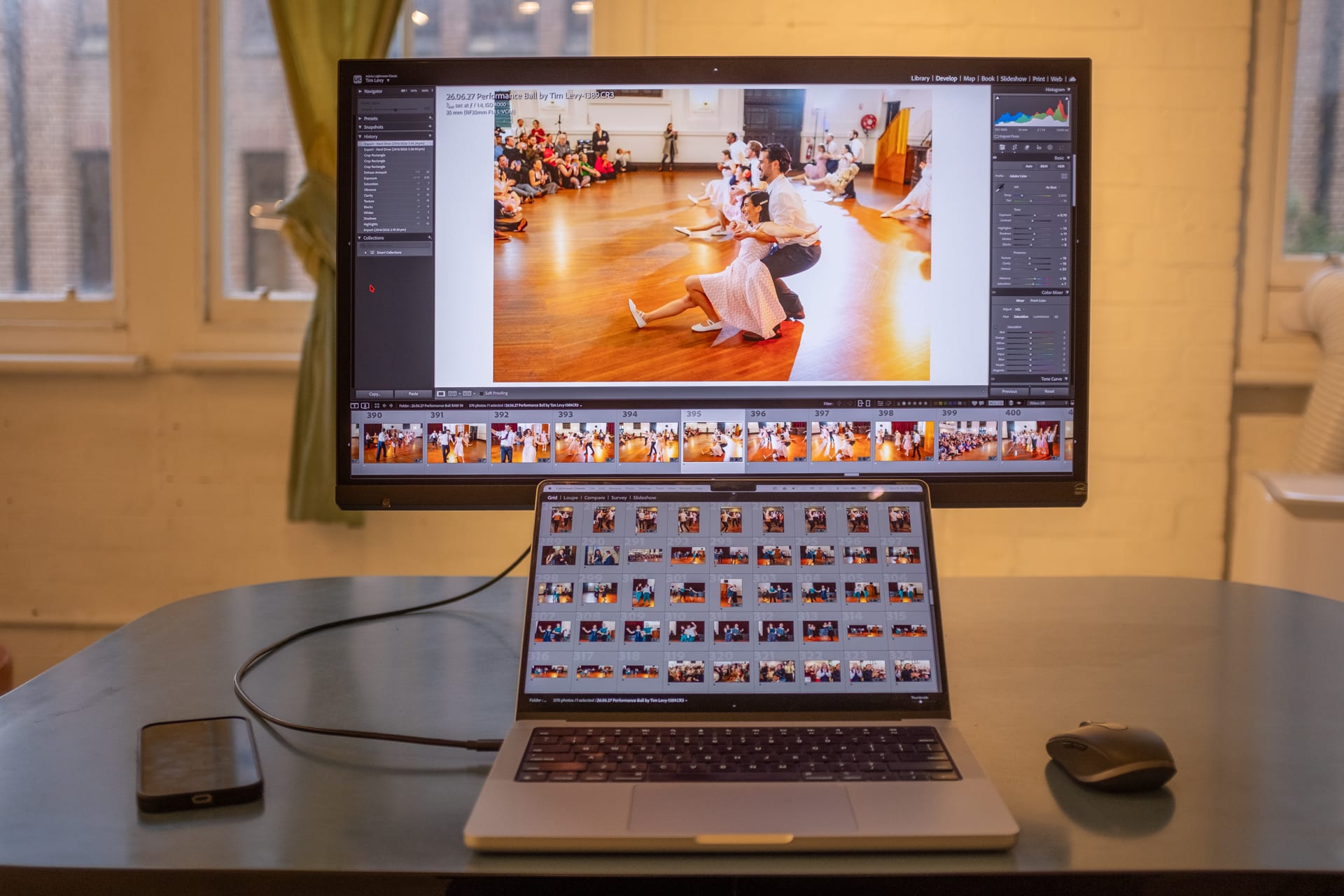
The 5K market battle
When the LG entered the fray with a slightly cheaper 27-inch 5K monitor (the LG Ultrafine 5K Display) that utilised the exact same panel as the ASD, it was definitely a good option, but its plastic build quality and less stable software reliability were noted by those in the know.
More recently, Samsung introduced the ViewFinity S9, aiming squarely at the Studio Display with a matte panel and an integrated webcam, but it remained expensive at the original price of $2,299 for those seeking genuine value. Apple has even recently updated their Studio Display line (still just called the Apple Studio Display) – though it failed to introduce meaningful upgrades, leaving a demographic of prospective buyers profoundly disappointed. Enter the BenQ MA270S.
Priced at an aggressive $1,499, the BenQ MA270S lands on the market at a staggering $1,100 cheaper than the baseline Apple Studio Display. What makes the MA270S so intriguing is not just its affordability, but how many core specifications it shares with the premium benchmark.
Like the Studio Display, the BenQ features an IPS (in-Plane Switching) with LED backlight, 27-inch screen size and an identical 5K resolution (5120 × 2880), hitting that critical 218 pixels per inch (ppi) sweet spot. This exact pixel density is the secret sauce of macOS layout scaling; it guarantees crisp text, precise UI elements, and most importantly - photographs without 'jaggy' pixels.

Head to head with the Apple Studio Display
While both panels support the wide P3 colour space, they diverge significantly in performance, design, and multimedia capabilities. The Apple Studio Display offers a brighter viewing experience at 600 nits, compared to the 450 nits delivered by the BenQ MA270s. Interestingly, in my real world testing, I found that it matched the constant brightness of my Macbook 14" monitor at full brightness, though I would typically have both screens at around 80% for eye comfort.
However, the BenQ gains a distinct edge in contrast and motion handling, boasting a 2000:1 contrast ratio and a slightly higher 70Hz refresh rate alongside its Nano Gloss Panel. In comparison, the Studio Display runs at a standard 60Hz. Apple does not officially publish its contrast ratio – though independent tests place it around 1200:1.
The integrated multimedia experience heavily separates the two models. The ASD functions as a complete, all-in-one communication hub by integrating a 12 MP Ultra Wide webcam, a high-quality three-microphone array, and a high-fidelity six-speaker system with force-cancelling woofers. While Apple does not disclose the exact wattage of these speakers, the system supports Spatial Audio and delivers surprisingly good sound. Outfitted with its basic, tilt-adjustable stand, the Apple monitor remains reasonably light at 6.3kg.
By contrast, the BenQ MA270s completely lacks a built-in webcam or microphone, meaning users must supply their own external peripherals for video calls. Its built-in audio is also far more modest, relying on a basic pair of 3W speakers that do a reasonable job but lack deep acoustic depth. Personally, I find the MacBook's speakers to be of decent quality, though if I was wanting higher fidelity, I'd use headphones.
While BenQ may lack extra embedded peripherals, the monitor's stand has superior physical ergonomics, offering a fully adjustable, and decent looking stand that allows for height, tilt, and swivel adjustments.
Connectivity further defines their differing design philosophies. The ASD has 2X Thunderbolt 5 ports capable of 120Gbps, paired with two 10Gbps USB-C ports. Meanwhile, the BenQ MA270s has a 40Gbps Thunderbolt 4 port, two HDMI ports, and dedicated 35W and 15W USB-C ports.

The housing / chassis
To bring down the price by $1,100 – BenQ naturally had to make deliberate compromises not just with embedded peripherals, but also in structural materials. Where Apple wraps its display in a solid block of machined aluminium, the MA270S chassis relies extensively on high-grade plastic. The silver finish does an admirable job of mimicking a Mac aesthetic from a distance, and it looks a lot better than most generic office monitors on the market.
But – what BenQ sacrificed in premium material allure, they arguably clawed back in practical ergonomics. The included stand looks good and is easy to adjust. With the ASD to have similar adjustments you need to purchase a 'Tilt- and height-adjustable stand' for an extra $700!
The MA270S stand permits smooth height adjustment, tilt, and pivot functionality, allowing users to rotate the monitor into a full vertical orientation effortlessly – a massive boon for programmers, copywriters, and UI designers working on long-form mobile layouts.

Colour matching technology
One of the most profound engineering triumphs of the MA270S is its bespoke colour-matching technology. Standard monitors plugged into a MacBook Pro or MacBook Air often exhibit jarring colour shifts, disparate contrast ratios, and mismatched white balances, ruining visual continuity across dual-screen setups.
BenQ has solved this by engineering specialised hardware-level technology designed to analyse and mimic the exact visual characteristics of various MacBook displays (would you believe they are all slightly different). The resulting uniformity is excellent; moving a photography asset or colour-critical window from a liquid retina laptop display to the MA270S yields an almost seamless visual transition.
For us photographers, there is an added bonus here – uniformity throughout the entire Apple environment. What we see on our studio monitors will have a remarkably similar colour and output on iPhones and iPads. This cross-device ecosystem matching is crucial for modern digital workflows.

70Hz refresh
On the specification sheet, one detail immediately stands out as an anomaly: the monitor operates at a native 70Hz refresh rate, rather than the conventional 60Hz standard found in most productivity displays or the high-end 120Hz ProMotion panels. This prompts the question: does this 10Hz bump offer an advantage in the real world?
In casual day-to-day operations, the difference is subtle. It provides an incremental layer of fluid responsiveness when scrolling through dense spreadsheets, or navigating the macOS interface. It is a welcome addition that makes the user experience feel slightly more responsive than standard 60Hz panels, even if it acts more like a pleasant bonus rather than a primary selling point.
MacOS integration
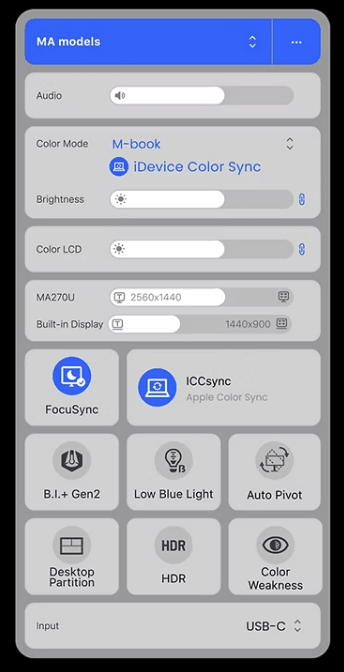
True integration with the macOS ecosystem requires software harmony. Annoyingly, Apple famously blocks third-party displays (and many other peripherals) from accessing native macOS controls, locking down its ecosystem with a protective, almost monopolistic rigour.
BenQ bridges this gap with their newly updated Display Pilot 2 application. This software acts as the control centre for the monitor, running discreetly in the Mac menu bar.
Through Display Pilot 2, users can adjust brightness, manage colour profiles, and assign shortcuts.
While Display Pilot 2 is a highly stable alternative that handles layout partitioning and profile switching beautifully, it remains an application overlay rather than a native system-level handshake.
The wrap up
With Apple failing to impress the premium display market during its recent ASD iterative refresh, many Mac users have felt questioning the price of the Studio Display ecosystem – especially in Australia, especially when the US price is $1,599.
The BenQ MA270S capitalises on this vacuum perfectly. By trading premium aluminium for functional plastic, BenQ has delivered a razor-sharp, 218 PPI, 5K panel that respects the strict scaling requirements of macOS while maintaining excellent colour-matching uniformity. Meanwhile, for panel lighting uniformity, BenQ has a 'Uniformity' feature to ensure there is no gradation or fading of whites in the corners of the panel.
I have genuinely enjoyed my time using this display at our studio, and it will be a bittersweet moment when it goes back to BenQ, or more to the point, when I go back to a much smaller 14" built in MacBook monitor.
Supported by a flexible, vertical-ready stand and the smooth responsiveness of its unique 70Hz refresh rate, the MA270S establishes itself as a pragmatic alternative for creative professionals unwilling to pay the 'Apple tax'. For many, a pocketed saving of $1,100 is simply too significant to ignore.
At this price point, you could comfortably buy a dual-monitor setup for the cost of a single Studio Display (with adjustable stand). Alternatively, for those who already own Apple’s flagship screen, the MA270S serves as a reasonably priced secondary panel – allowing you to expand your desktop real estate while leaning on the Studio Display for its webcam, microphone array, and speakers.
The current street price for the BenQ MA270S is $1,499. You can find out more on the BenQ website.