


When it comes to gallery-quality fine art photographic printing, Canon and Epson stand unchallenged as the two premier manufacturers on the market.
Both brands have spent decades refining printhead precision, ink chemistry and media handling to ensure that what a photographer sees on a calibrated screen – translates faithfully onto archival fine art paper.
In this article, we explore the nuances of printing at home and break down the current options on the market, weighing up the pros and cons of the Canon imagePROGRAF PRO-1100, Epson SureColor P906 and Epson SureColor P5360.
A2 printers – exhibition-size prints from manageable machines
For photographers seeking a decent print size, A2 (42 x 59.4 cm) occupies a distinct sweet spot in fine art production.
An A2 print commands genuine visual presence on a wall while remaining practical to produce in a studio or small home office. Step beyond A2, and everything from the hardware and paper to the framing gets bigger, heavier and considerably more expensive.
Current 100 cm (print width) professional printers can weigh over 170 kg and cost north of $17,000. If you want to run one of these commercial-grade machines at home, you'll eventually have to have a tough conversation with your partner about sacrificing either the garage or the kids' bedroom to create a dedicated print room. Realistically, those behemoths are best left in a professional print lab to store and maintain.
Frame-wise, an A2 print sits beautifully inside an A1 sized frame (approx. 64 x 88cm) when paired with a generous window mat. Alternatively, adding a 2–3 cm printed white border lets the image sit neatly inside a standard off-the-shelf A2 frame.
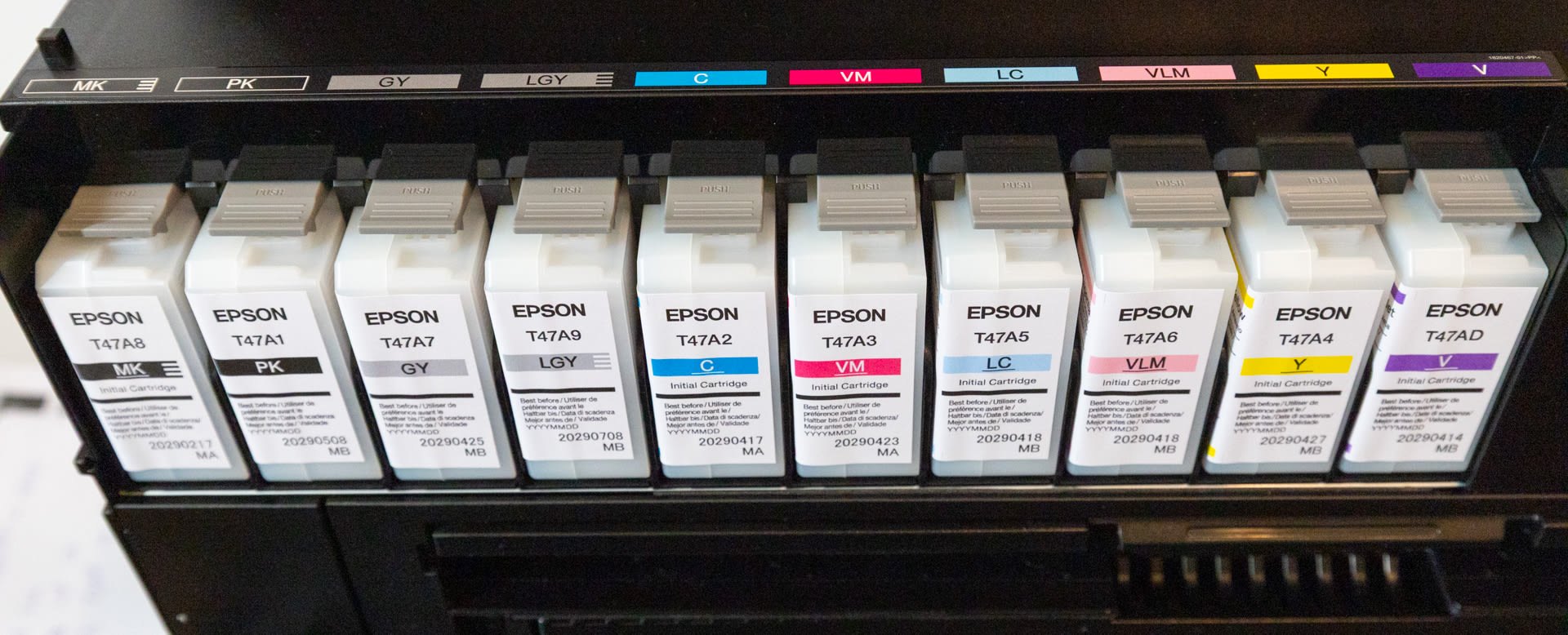
Image: Tim Levy
Ten to twelve ink tanks! Whuuut?
To appreciate why these modern machines are so precise, it helps to look at how far desktop printing has come from traditional four-colour CMYK systems.
Standard CMYK printers rely on cyan, magenta, yellow and black to build every shade and colour in an image. While efficient for office documents or basic graphic design, CMYK systems struggle with subtle tonal gradations, smooth skin tones and rich shadow detail.
Modern professional photo printers solve this by deploying expanded pigment ink sets with eight, ten or twelve distinct channels. By adding light cyans, light magentas, multiple shades of grey and specialised gloss optimisers, these engines eliminate visible dot patterns and deliver extraordinary tonal depth.
Giclée printing
This expanded palette is fundamental to producing true 'Giclée prints' – the fancy term for archival photo inkjet prints.
Galleries usually call the finished prints either archival pigment prints, fine art inkjet prints, or Giclée prints.
These terms separate the ink process from 'chemical C-prints', which are created via the image being exposed / projected onto light-sensitive photo paper with lasers or LEDs and then run through old-fashioned chemical baths.
Giclée is derived from the French word gicleur, meaning to squirt or spray. There is no ISO governing body that enforces, or stipulates what a true Giclée print is, though in practice it denotes an archival fine art print combining a professional pigment printer, OEM archival inks and museum-grade paper.
Unlike dye-based inks that soak into paper fibres and fade rapidly under light exposure, pigment inks deposit microscopic, lightfast mineral particles onto the paper surface via printheads packing thousands of nozzles at resolutions well above 1,200 dpi.
To put 1,200 dpi* into perspective, standard magazine printing is 300 dpi, and a modern iPhone Retina display sits at 460 ppi. A generic computer monitor may only have a ppi of 120 – 170ppi, while an Apple Studio Display is 218 ppi. (*dpi = dots per inch for printing; ppi = pixels per inch for screens.)
When paired with archival stock such as 100% cotton rag or baryta paper, the resulting prints are rated to last over a century without noticeable fading or colour shift. Choosing fine art papers from specialist brands such as Canson, Ilford, Hahnemühle or Moab – or even from the printer manufacturers themselves – will ensure you get the best out of these machines.
So how long will these prints really last?
The short answer: they will most likely outlast the person printing them. Gaff-taping a print to an exterior sun-drenched brick wall or a car bonnet will, unsurprisingly, reduce its archival properties by approximately 1,000%.
Under typical framed, low-light indoor conditions, manufacturers claim a Giclée print from these machines will last 100 to 200 years.
However, these figures are theoretical projections rather than historical facts. Because fine art inkjet technology has only existed for a few decades, testing institutes such as Wilhelm Imaging Research (WIR) calculate longevity through accelerated laboratory simulation.
In practice, a print's permanence depends on real-world variables that lab tests can only approximate – direct sunlight, ambient humidity, frame sealing and the choice between standard or UV-filtering glass all play a part.
The current A2 print contenders
Currently, three flagship models define the 17-inch / A2 desktop lineup: the Canon imagePROGRAF PRO-1100 ($1,700–$2,050), the Epson SureColor P906 ($1,700–$1,800) and the heavy-duty Epson SureColor P5360 ($3,379–$3,500).
Each printer approaches fine art output with a slightly different operational philosophy.
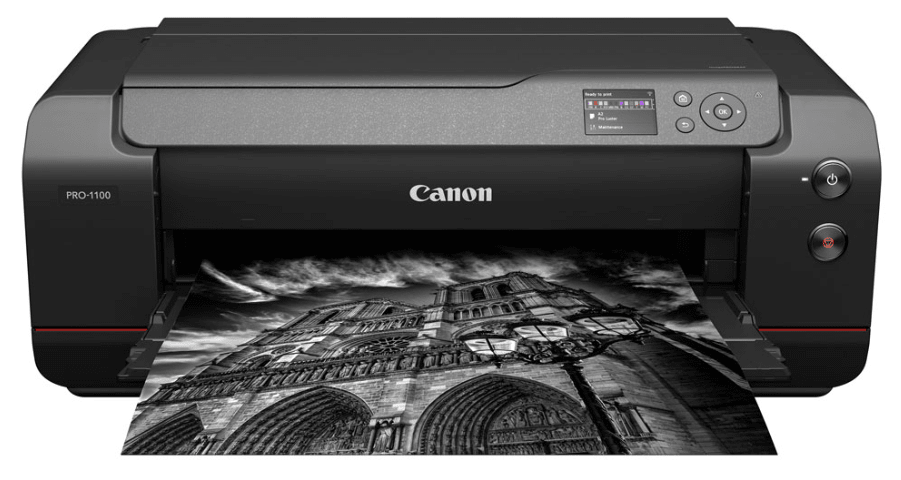
The Canon Pro-1100
Announced in October 2024, the PRO-1100 is Canon's latest 17-inch flagship, running the upgraded 12-tank LUCIA PRO II pigment ink system (11 colours plus a clear Chroma Optimiser). The reformulated inks add crystalline wax to boost scratch resistance on glossy stocks, deepen black density on fine art papers and push rated lightfastness up to 200 years, while the Chroma Optimiser evens out surface sheen and curbs bronzing.
To ensure precise dot placement on sheets up to A2, the PRO-1100 uses a vacuum suction air-feed system. This mechanism pulls paper flat against the platen during printing, preventing media deflection, head strikes and paper skew – an advantage when running thick cotton rag stocks borderless.
Media loads via a top tray (up to 0.3 mm) or a rear manual slot handling fine art stocks up to 0.7 mm thick. While it lacks a built-in roll feeder, it supports custom cut-sheet panoramics up to 3.27 metres long – nearly triple the limit of the older PRO-1000.
That heavy-duty chassis comes with substantial bulk, however. Measuring 72.3 × 43.5 × 28.5 cm closed and weighing a hefty 32.4 kg, the Canon is a two-person lift. Day-to-day operation runs through a 3.0-inch colour LCD with physical navigation buttons. It houses twelve individual 80 ml ink tanks (960 ml total onboard), offering decent capacity for longer print runs.
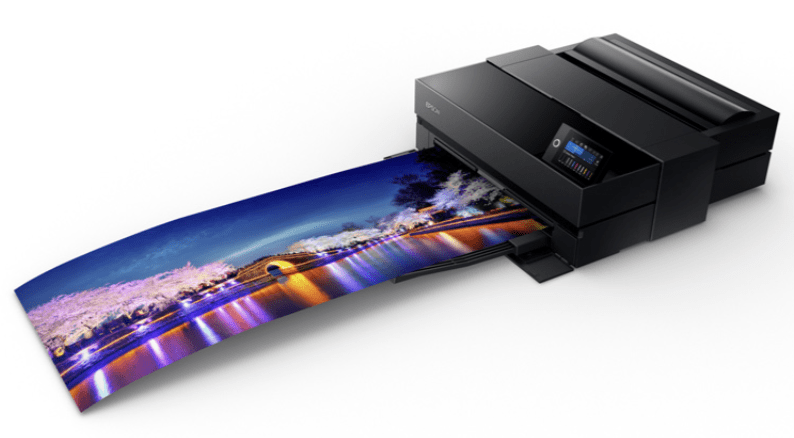
Image: Epson
The Epson SureColor P906
Released in February 2021, the SureColor P906 is engineered for space-conscious studios and solo practitioners. It runs Epson's 10-colour UltraChrome PRO10 pigment ink set, which includes Violet ink to expand the blue and purple colour gamut, alongside Black Enhance Overcoat technology to boost black density and reduce gloss differential on glossy and baryta stocks.
Unlike the Canon PRO-1100, the P906 relies on precision mechanical roller feeds rather than vacuum suction. That design allows it to pack A2+ output into a remarkably compact footprint – roughly the size of an older A3+ machine – and a manageable 14.8 kg weight, making it light enough for one person to move easily.
Despite its smaller frame, media versatility is a strong point: the front fine-art path handles thick poster board up to 1.5 mm (double the PRO-1100's thickness) and an optional roll-paper unit adds panoramic capability – or the ability to do larger print runs.
Day-to-day operation is straightforward, aided by a sealed, dust-resistant chassis, a customisable 4.3-inch colour touchscreen and an internal LED light that lets you inspect prints as they emerge.
The main trade-off for its compact build is ink capacity: its cartridges hold 50 ml per tank, which keeps initial consumable outlays lower but may require more frequent replacements if you're printing in high volume.
The Epson SureColour P5360
For high-volume studios and print labs, Epson offers the SureColor P5360 (released December 2023). It pairs the same 10-colour UltraChrome PRO10 ink architecture – including Violet ink and Black Enhance Overcoat – with a commercial-grade chassis built for sustained daily output. Like the Canon PRO-1100, it uses a vacuum suction system to hold media flat against the platen and resist paper curl.
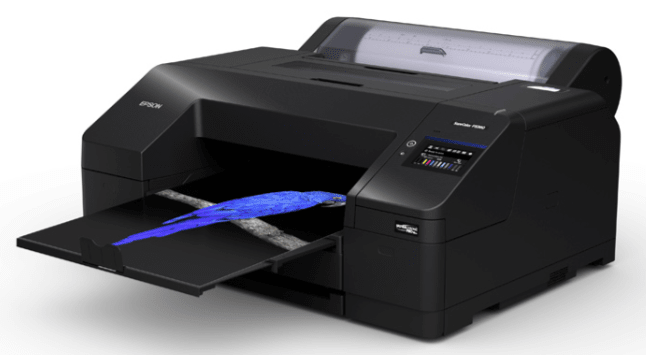
Where the P5360 pulls clear of other desktop models is media handling. It features an integrated spindle-style roll-feed unit with a heavy-duty rotary auto-cutter that trims prints in under five seconds, alongside a barcode system to track remaining roll length.
For pre-cut paper, a high-capacity front cassette holds up to 100 photo sheets from A4 to A2, while top and straight-through manual paths handle thick fine art stocks and poster board up to 1.5 mm.
Built like a tank, the P5360 weighs 53 kg (without ink) and measures 86.3 × 76.6 × 40.5 cm closed, demanding a permanent, sturdy bench – moving it is a two-person job at minimum, and ideally three.
Day-to-day control runs through a 4.3-inch colour touchscreen, which features the image you are printing. To keep up with heavy workloads, it takes massive 200 ml ink tanks – four times the capacity of the P906 – and two and a half times the PRO-1100, significantly reducing the cost per millilitre of ink and minimising cartridge swaps.
The showdown
Print speed
Print speed across the trio depends on resolution settings and feed mechanics. As a general rule, the slower the print speed, the higher the print quality – ranging anywhere from four minutes up to a painfully slow 35 minutes for an A2 print.
Does the image feature deep blacks or long, smooth sky gradations? Push the speed too high and you risk visible banding. While it's easy to spit out a quick test print on a fast draft setting, gallery-ready fine art output demands patience.
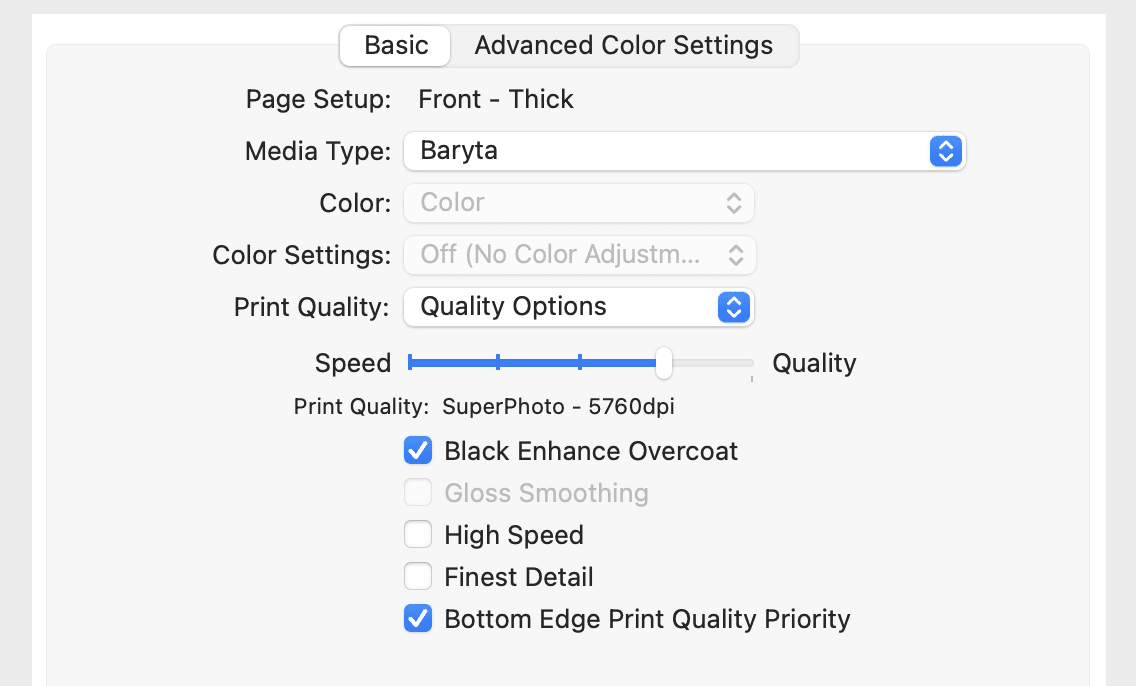
At standard photo quality settings, the Canon PRO-1100 produces a bordered A2 print in around four minutes, while the Epson P906 turns out a comparable A2 sheet in four to five minutes. Set any of the printers to the finest / highest 5760 dpi 'SuperPhoto' settings and you may be waiting 30 minutes per A2 print.
To help speed up printing, you can choose 'high speed' which means the print head sprays ink on each pass – back and forth – as opposed to only one direction.
The commercial P5360 edges ahead in continuous production, particularly on roll media, where its optimised head movement and automated cutter streamline batch workflows. The P5360 also has a large capacity cut paper drawer that helps in batch runs.
The Epson P906 allows heavy fine art paper stock via a front feeding system, while the Canon PRO-1100 feeds through the rear.
On either system, you'll need to allow the rear of the printer to be half a meter from the wall. This 'feeding' time isn't conducive to large print runs as it is a fully manual process, with a bit of button pressing 'ok' steps in-between the actual printing.
Overall though, real-world speeds across these three are closely matched. If you need dramatically faster throughput, you'll have to step up to larger wide-format printers with much wider printheads that lay down significantly more ink per pass.
Print quality
Interestingly, the Epson SureColor P5360 uses the exact same printhead as the SureColor P906 – Epson's 10-channel MicroPiezo AMC head paired with UltraChrome PRO10 inks. So while you pay considerably more for the P5360's build, roll handling and ink economy, the actual print quality is visibly identical.
All three printers offer true edge-to-edge borderless printing across standard cut-sheet sizes, allowing full-bleed prints without trimming.
Running borderless on cut sheets does require overspray management to keep the internal carriage clean, with excess ink collected in a replaceable maintenance cartridge. Always keep a spare on hand – they fill up faster than you'd expect and cost around $25–$40.
When comparing specifications, it's easy to assume Epson's 5,760 x 1,440 optimised dpi delivers more than double the detail of Canon's 2,400 x 1,200 dpi. In reality, both brands measure 'dots per inch' differently, and dpi reflects how the printhead places microscopic ink droplets rather than the optical detail extracted from your camera file.
Canon achieves its 2,400 x 1,200 dpi rating through high nozzle density and uniform, ultra-fine droplet placement. Epson reaches 5,760 x 1,440 optimised dpi using Variable Sized Droplet Technology, firing minuscule droplets for delicate highlights and larger ones to fill solid colour blocks efficiently.
While the spec-sheet gap looks wide, both systems comfortably exceed what the human eye can resolve at normal viewing distances. In the real world, print quality comes down to your image file, print settings and colour management. At maximum quality settings, you'd be hard-pressed to pick a winner between the two brands.
Running costs
If you print regularly and value the control of working in your own studio, these machines are hard to beat. A professional lab charges more per print of course (at around $70 for A2 Giclée print), but they also absorb the maintenance, ink waste and bench space costs.
Doing some rough maths, instead of ordering 30 x A2 prints (approx $2,100) from a professional lab, you are getting close to purchasing a PRO-1000 or EPSON P906 with paper. Just be aware that you'd need to replace a set of ink tanks by the end of a 30 print run – which may add another $600+ to the equation, as well as a $30 maintenance tank.
The biggest ongoing hit to your wallet is replacing multiple ink tanks. Some colours drain much faster than others, so it pays to keep spares on standby. Don't be surprised if a tank showing 10% remaining suddenly empties during a cleaning cycle. Buying full ink sets often attracts a modest discount and helps soften the blow.
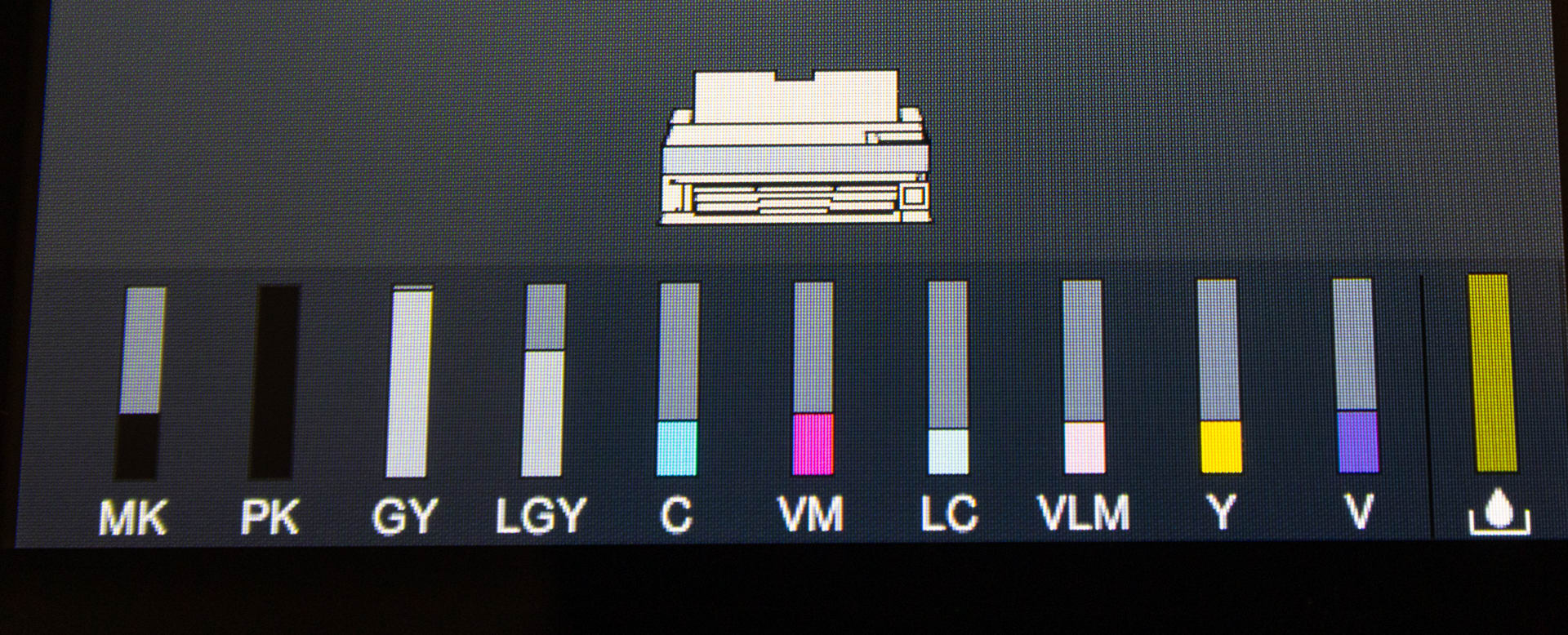
– especially if your prints are primarily low key. Image: Tim Levy
Other costs will include the afore mentioned 'maintenance tank' which captures excess ink flushed out during routine printhead cleaning cycles, borderless overspray, and system purges.
Once its internal pads become fully saturated, the printer stops operating until a fresh tank is installed to prevent ink from overflowing into the chassis. If you are purchasing one of these printers – it's a good idea to buy one on the outset.
Printhead lifespan and replacement costs also differ markedly depending on whether you choose Canon's thermal design or Epson's permanent piezoelectric system.
The Canon PRO-1100 uses a user-replaceable PF-10 printhead that typically lasts two to five years (roughly 1,000 to 3,000 prints) and swaps out in under five minutes for around $800–$970 AUD.
By contrast, the MicroPiezo heads in the Epson P906 and P5360 are engineered as permanent components built to last the five-to-seven-plus-year life of the machine. However, if an Epson head fails out of warranty, replacement requires an authorised technician – making an extended service contract a sensible investment.
Canon's A2 printers have also earned a reputation for heavy ink consumption during idle periods due to their timer-based maintenance cycles. If the PRO-1100 sits unused for several days or weeks, it automatically runs purges across all 12 channels into the waste tank – even if you only print in black and white.
Crucially, cutting power to the Canon resets its internal timer, triggering a heavy, wasteful deep clean on startup. While this proactive approach protects the thermal printhead from drying out, it makes the PRO-1100 a costly proposition for sporadic, low-volume users who may find more ink ending up in the maintenance tank than on paper.
According to Keith Cooper, a popular YouTuber with a high technical understanding of photographic printing (see clip above), when left powered off for a week, the Canon Pro-1100 consumes a total of 45g of ink across its 12 cartridges during the subsequent startup and maintenance cleaning cycle. This equates to just under 5% of a full 80ml cartridge.
Based on individual cartridges costing around AU$80 using roughly half a 80ml cartridge's worth of ink for a single wake-up cycle amounts to an estimated cost of approximately AU$40. The presenter highlights this substantial ink loss to emphasise why leaving the printer permanently switched on is the most cost-effective practice.
Conversely, Epson approaches clog prevention with a reactive strategy, utilising permanent Piezoelectric printheads that check nozzles electronically and only clear channels where an actual blockage is detected.
Models like the Epson P906 and P5360 can sit idle for significantly longer without initiating unprompted, multi-channel ink dumps. Even so, Epson strongly recommends leaving the printer switched on and plugged into a live power outlet.
In any case, self cleaning is inevitable with either brand with 'waste ink' going into a maintenance tank. Also after thousands of prints, you will have to replace the print head. This would be unlikely for general consumer use, though likely with professional or high volume print shops.
The verdict
Any of these three printers will deliver stunning results. After printing extensively with both the Canon PRO-1000 (the PRO-1100's predecessor, sharing the same printhead and a similar ink set) and the Epson SureColor P906 – and closely analysing output from both – it is genuinely hard to distinguish between them. Both are capable of producing remarkably detailed fine art prints with smooth colour gradations that faithfully match a calibrated monitor, so any buyer will be more than happy with the image quality.
The Epson SureColor P906 is the cheapest, lightest and most compact option. It shares virtually the same ink and printhead technology as its bigger, heavier and more expensive sibling – the P5360 – though it relies on the smallest ink tanks of the group at 50 ml each. Choose the P906 if you want professional-grade fine art output with a lower entry cost and a desk-friendly footprint for a home or smaller studio.
The Canon imagePROGRAF PRO-1100 has a stellar reputation for fine art output and is only slightly more expensive than the P906. Choose it if you prioritise absolute flatness via its vacuum feed system, want larger 80 ml cartridges and don't mind a chassis twice the weight of its Epson rival. Just make sure you leave it constantly powered on: its cleaning cycles consume significantly more ink – enough to make you weep if someone accidentally switches it off at the wall – which can lead to higher running costs than the P906. Canon's new wax-infused ink is also designed to prevent scratching; while we haven't put that to an extreme test yet, I have raw PRO-1000 A2 test prints on my garage wall that are still holding up just fine after years in what may be the worst conditions possible.
The Epson SureColor P5360 is a beast. Weighing in at 53 kg (without ink), with a large footprint and giant 200 ml ink tanks, it is a true commercial workhorse built for print shops, galleries and high-volume studios. Like the Canon PRO-1100, it features vacuum feeding, while also adding integrated roll handling for commercial runs and panoramic formats. That roll handling cuts down printing times dramatically on larger editions compared with feeding thick art paper one sheet at a time from the front on the P906, while those massive tanks slash both cartridge changes and per-millilitre ink costs.
Of course, using a local photographic print lab is always a smart option if you don't plan on printing regularly. Be warned, though – like photography itself, printing your own artwork can be slightly addictive, and once you own one of these machines, you'll likely find yourself printing more than you ever imagined.