


Adobe has introduced a series of workflow updates and generative tools to Photoshop, aiming to reduce repetitive tasks while expanding non-destructive editing options. The new features focus on lighting adjustments, contextual masking, design flexibility, and a dedicated AI-assisted editing environment.
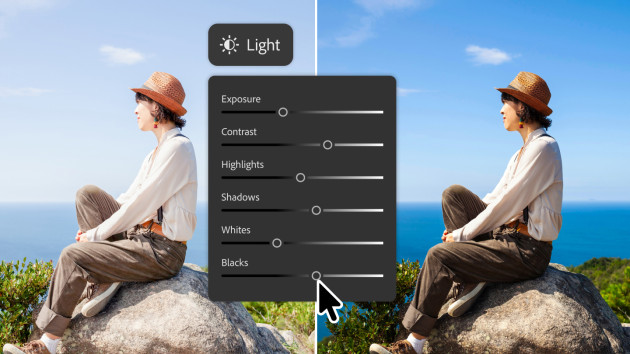
Non-Destructive and Contextual Editing
-
Light Adjustment Layer: Adds dedicated tone and lighting controls – including Exposure, Contrast, Highlights, Shadows, Whites, and Blacks – directly into a standard adjustment layer. This allows photographers and retouchers to apply Camera Raw-style adjustments within the main layer stack.
-
Instruct Edit with Masks: Powered by Firefly Image 5, this tool interprets contextual natural-language descriptions alongside masks. Users can specify localized changes – such as altering specific accessories or facial features – while leaving surrounding areas, branding, and unmasked elements unchanged.
-
AI Markup: Enables visual prompting directly on the canvas. Users can sketch arrows, outline rough shapes, or circle target zones to indicate placement, replacement, or recolouring, complementing text prompts with spatial guidance.
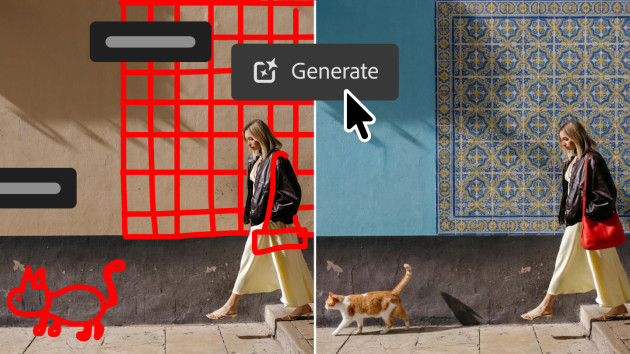
Markup. Image: Adobe
Layout and Asset Management
-
Dynamic Text, Shapes, and Paths: Expands dynamic text handling to custom vector shapes and paths. Text reflows and adapts along curves and irregular layouts without requiring manual formatting resets.
-
Adobe Stock Panel Integration: Adds a dockable native panel providing direct access to the Adobe Stock library of over 900 million assets for searching, previewing, and licensing within the workspace.
AI Assisted Editor. Image: Adobe

AI-Assisted Editor (Beta)
Adobe has also introduced a dedicated AI-assisted editor interface in beta, consolidating prompt-driven tasks into a single workspace. Key tools include:
-
Prompt to Edit: Applies multi-step image adjustments using descriptive text commands.
-
Remove Background: Isolates subjects and cleans edges in a single step.
-
Generative Expand & Generative Fill: Extends canvas boundaries or adds, removes, and alters elements using generative fill models.
-
Remove Tool: Erases distractions and fills the underlying texture to match the original scene.
-
Generative Upscale: Enhances image resolution while maintaining edge detail and texture fidelity.
Adobe will be rolling out the update over the next week. You can learn more about the latest Photoshop updates on the Adobe website.